
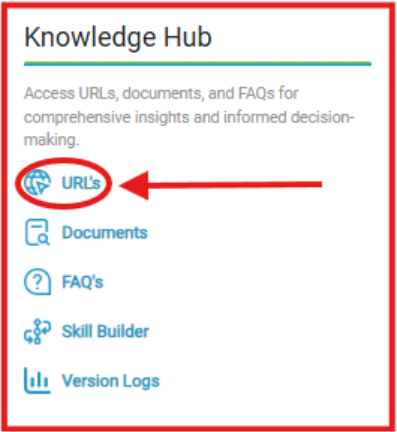
What you see:
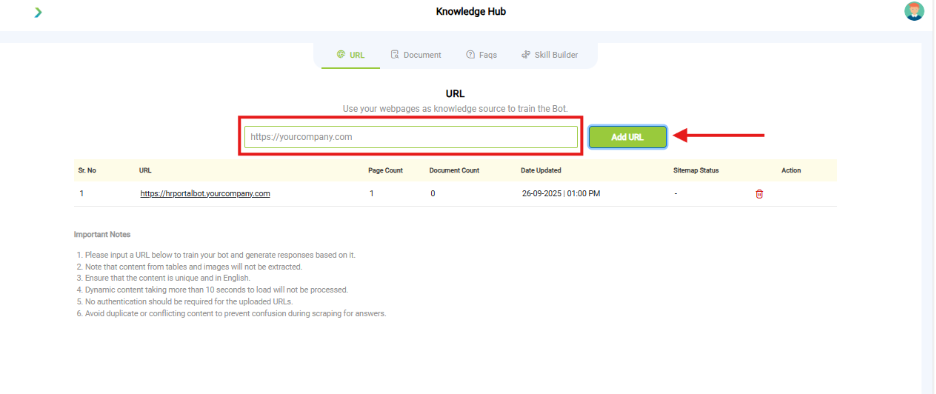
Input field to add website URLs.
- URL Setup Options
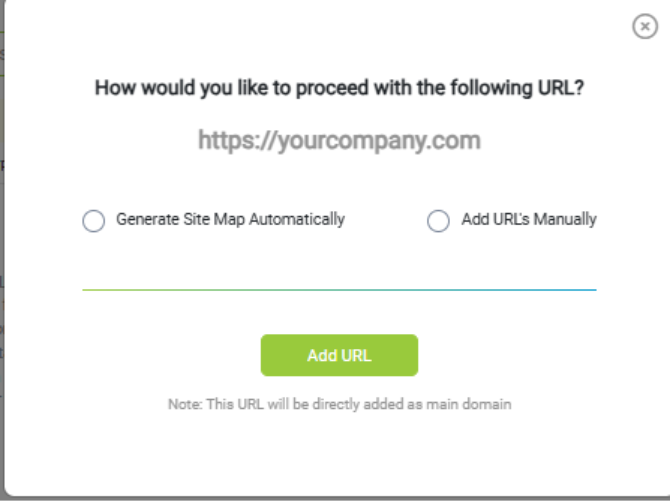
- Auto-Crawl: Generate Site Map Automatically
- Manual Entry: Add URLs Manually
- Note: The URL will be added as the main domain.
- Action Button: Add URL
- Status column (Pending, Crawled, Failed).
Why it matters:
- URLs let your bot pull content directly from your website.
- Auto-crawl saves time by fetching all linked pages.
- Manual mode is useful when you only want specific pages.
What you need before this step:
- A live, publicly accessible website.
- Confirmation that the website allows crawling (robots.txt not blocked).
Outcome after action:
- Content from URLs becomes part of the bot’s knowledge.
Best practice:
- Use Manual mode for FAQs/support pages.
- Re-crawl periodically to keep content fresh.