
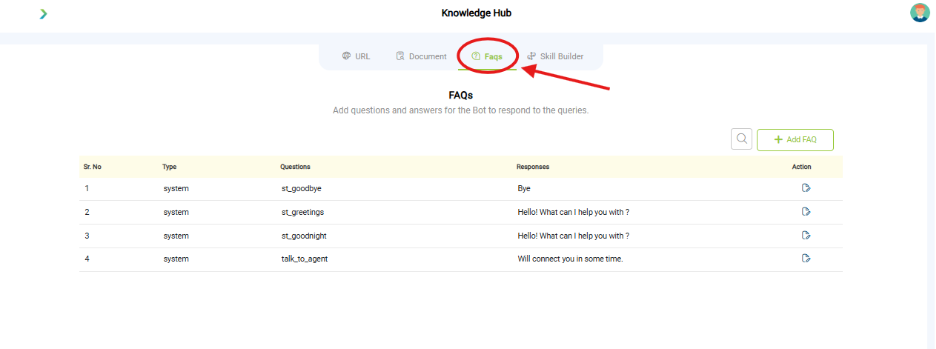
What you see:
- FAQs Page – Key Features

-
- Default FAQs:
-
-
- 4 system-generated entries (st_goodbye, st_greetings, st_goodnight, talk_to_agent)
-

-
- Editable Entries:
-
-
- Each FAQ can be modified or deleted.
- Editable Features – FAQ Creation Interface
- Topic Selection: Dropdown: Select / Add Topic
- Topic Selection: Dropdown: Select / Add Topic
- Question Input: Text field: Enter your question
- Bot Response: Text area: What will bot response
- Response Enhancements:
- Add elements to the bot’s reply:
- + Text
- + Button
- + Image
- + Location
- + List
- + Text & Buttons
- + Attachment & Text
- + Attachment, Text & Buttons
- + SSML (for speech synthesis markup)
- Save Button: Finalize and save the FAQ entry
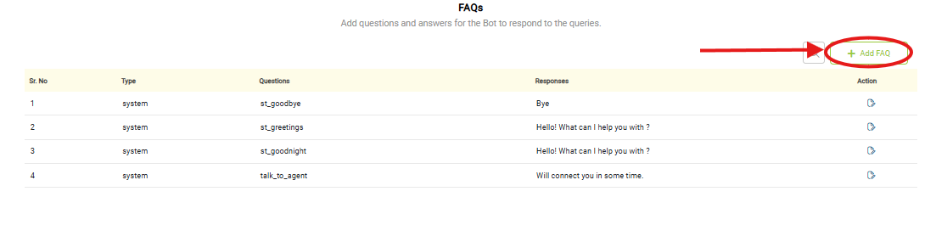
- Add FAQ Button:
- Allows users to create new FAQ entries.
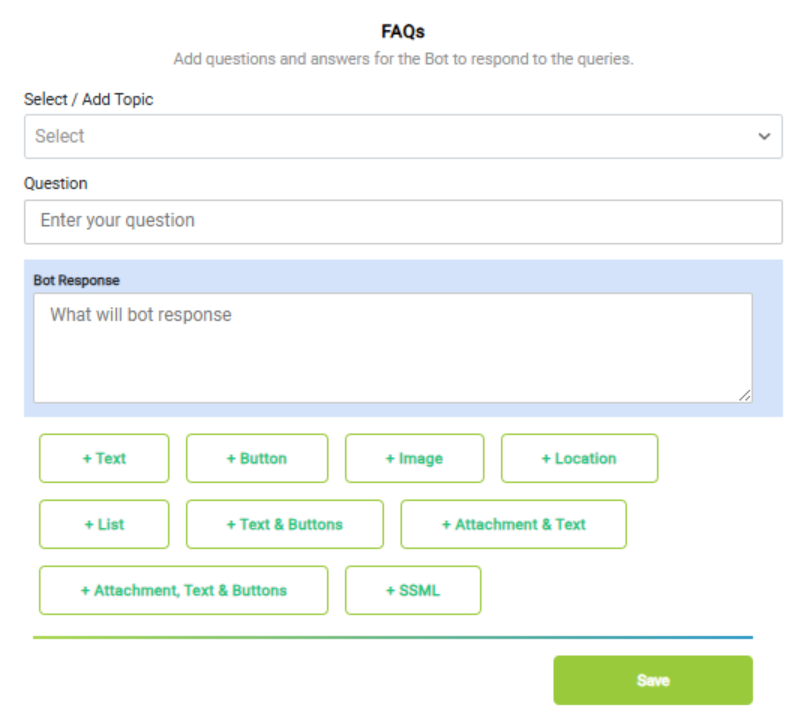
- Allows users to create new FAQ entries.
- Editable Features – FAQ Creation Interface
- Topic Selection: Dropdown: Select / Add Topic
- Question Input: Text field: Enter your question
- Bot Response: Text area: What will bot response
- Response Enhancements:
- Add elements to the bot’s reply:
- + Text
- + Button
- + Image
- + Location
- + List
- + Text & Buttons
- + Attachment & Text
- + Attachment, Text & Buttons
- + SSML (for speech synthesis markup)
- Save Button: Finalize and save the FAQ entry
- Search Functionality:
- A search icon is available to filter or find specific FAQs.
-
Why it matters:
- FAQs give precise, structured responses to common queries.
- Bulk upload speeds up initial setup.
What you need before this step:
- A list of FAQs in Excel/CSV format.
- At least the 4 default FAQs (Greeting, Good Night, Talk to Agent, Goodbye).
Outcome after action:
- FAQs get stored and are immediately usable once trained.
Best practice:
- Use simple, user-friendly language.
- Group FAQs by topics (billing, support, general info).