
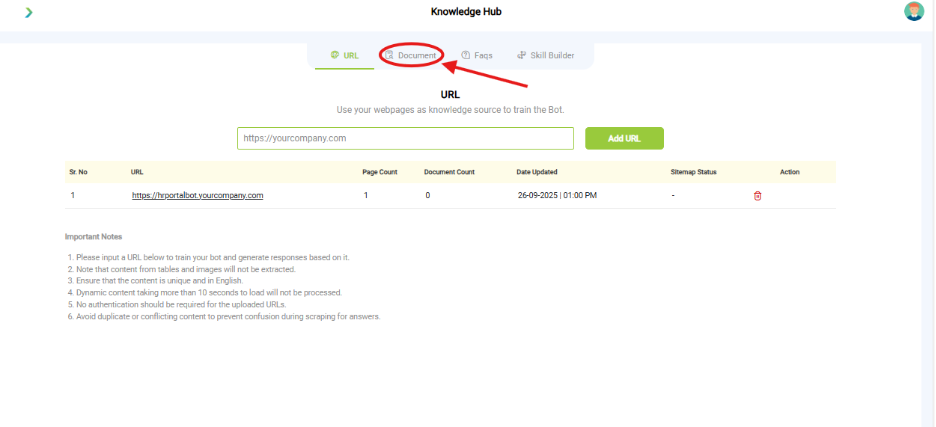
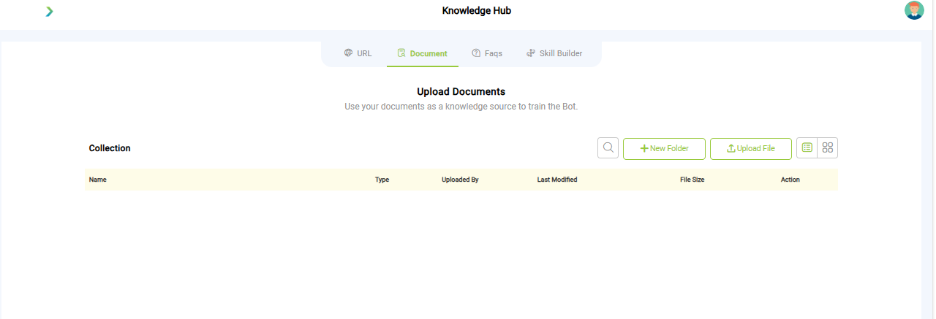
What you see:
- Document Upload Options
-
- Supported formats: PDF, DOCX, TXT
-
- Upload methods:
-
-
- Upload File button
-
-
-
- New Folder for organizing files
-
- List View Display
-
- Columns shown:
-
-
- Name
-
-
-
- Type
-
-
-
- Uploaded By
-
-
-
- Last Modified
-
-
-
- File Size
-
-
-
- Action
-
Why it matters:
- Documents let you provide structured information not available on your site.
- Helps in scenarios like policy documents, guides, or offline PDFs.
What you need before this step:
- Supported file format under 10MB.
- Clean text-based docs (avoid scanned images).
Outcome after action:
- Uploaded files feed into bot’s answers.
Best practice:
- Use one document per topic (e.g., “Refund Policy.pdf”).
- Avoid uploading duplicate or outdated versions.